Course Curriculum & Learning Progression
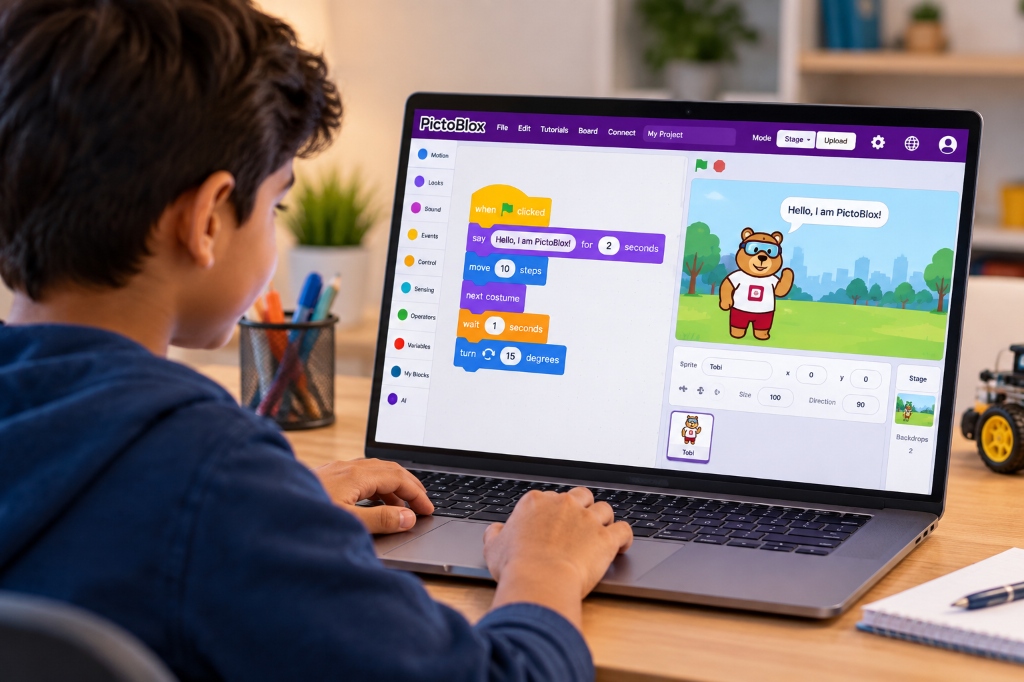
The PictoBlox curriculum at Axilearn is hands-on, project-based learning aligned with NEP 2020. Each level builds on the one before:
- Level 1: core coding concepts (sequence, loops, events, conditions and variables) through animations and games
- Level 2: PictoBlox's ready-made AI extensions to add vision, speech, text and chatbot abilities to projects
- Level 3: the PictoBlox Machine Learning Environment, where learners collect data, train their own models and use them in real-world AI applications
Structured Level Breakdown
Code Quest 🎮
What PictoBlox is, a tour of its interface, and core block-coding concepts, learned by animating characters and building fun interactive games.
Topics Covered:
- What is PictoBlox? A Scratch-based block and Python coding platform by STEMpedia that supports languages like Hindi and Gujarati
- Getting Started: installing PictoBlox, choosing Block Coding, and a tour of the stage, sprites, block palette and scripting area; your first script to make Tobi move
- Motion: X–Y coordinates, move, turn, glide and bounce
- Looks: costumes, backdrops, say/think and colour effects
- Sound & Music: the sound library, recording your own sounds, and composing beats
- Events & Loops: green flag, key presses, sprite clicks, repeat and forever
- Conditions & Sensing: if/else, touching, key pressed and ask-and-answer
- Variables & Operators: score, lives, timers and random numbers
- Broadcasts & Clones: messages between sprites, and spawning objects for games
- Creative Tools: the Paint Editor for your own sprites, and Pen for drawing patterns
AI Superpowers ⚡
Adding real AI to block-coded projects. Using PictoBlox's AI extensions, learners' projects detect faces and emotions, track hands and bodies, recognise objects and text, listen, speak, translate and chat.
Topics Covered:
- What is AI? How computers see, hear and understand, with everyday examples
- Voice AI: making sprites speak with Text to Speech and speak other languages with Translate
- Listening AI: Speech Recognition for voice commands and voice-controlled games
- Face AI: face detection, expressions, age and emotion estimation, facial landmarks, and recognising known faces
- Body & Hand AI: tracking body pose and hand landmarks to control sprites without touching the keyboard
- Object AI: detecting and counting everyday objects with the camera
- Reading AI: recognising printed and handwritten text, and scanning QR codes and Recognition Cards
- Scene AI: the Computer Vision extension for identifying landmarks, brands and objects in images
- Chatbot AI: the ChatGPT extension for asking questions, getting AI responses and building a chatbot
- Responsible AI: privacy, consent for camera and face data, and when AI gets it wrong
ML Makers Lab 🧠
Training your own AI in the PictoBlox Machine Learning Environment. Learners collect data, train, test and improve all seven model types (image, object detection, hand pose, pose, audio, text, and number/regression), then use them in block-coded AI apps.
Topics Covered:
- How Machine Learning Works: learning from examples, classes and labels, and training vs testing
- Opening the ML Environment: creating a project, choosing a model type, and the train → test → export workflow
- Building Good Datasets: webcam capture, uploading and importing images, balanced classes, and "background" classes
- Image Classifier: recognising categories of images
- Object Detection (ML): drawing bounding boxes and training a detector for your own objects
- Hand Pose Classifier: recognising hand gestures and signs
- Pose Classifier: recognising full-body poses and activities
- Audio Classifier: recognising sounds and spoken words
- Text Classifier & NLP: understanding intent and sentiment in text
- Number Classifier & Regression: making predictions from tables of numbers
- Testing & Improving Models: training settings (epochs, batch size, learning rate), finding wrong predictions, adding better data and retraining
- Using Your Models: exporting to block coding and connecting predictions to sprites, sounds and speech
- Teachable Machine: loading an externally trained model by link and comparing it with the ML Environment
Course Summary
Key Highlights:
- A clear path: games & animation → AI extensions → machine learning
- Learn in English, Hindi or Gujarati with PictoBlox's multilingual interface
- 12+ AI extensions: face, body, object & text recognition, speech, translation & ChatGPT
- Train all 7 ML model types in the PictoBlox ML Environment
- Responsible AI: privacy, consent and AI limitations
- 23 mini projects and 3 level-end projects, including an AI for Good capstone
- Desktop App Requirement: Level 3 ML Environment model creation requires PictoBlox Desktop App (Windows, macOS, Linux).
- Cloud Extension Credits: Extensions like ChatGPT, Computer Vision & Speech Recognition operate on credit allocation.
- Multilingual Option: Native support for English, Hindi, and Gujarati interfaces.
- Young Learners (6–8): Junior track option available via PictoBlox Junior.
